
💫Released
📰 Press

“Ultimately, isn’t the goal simply to keep malicious messages out of sight?”
That simple question led to the creation of Clean+.
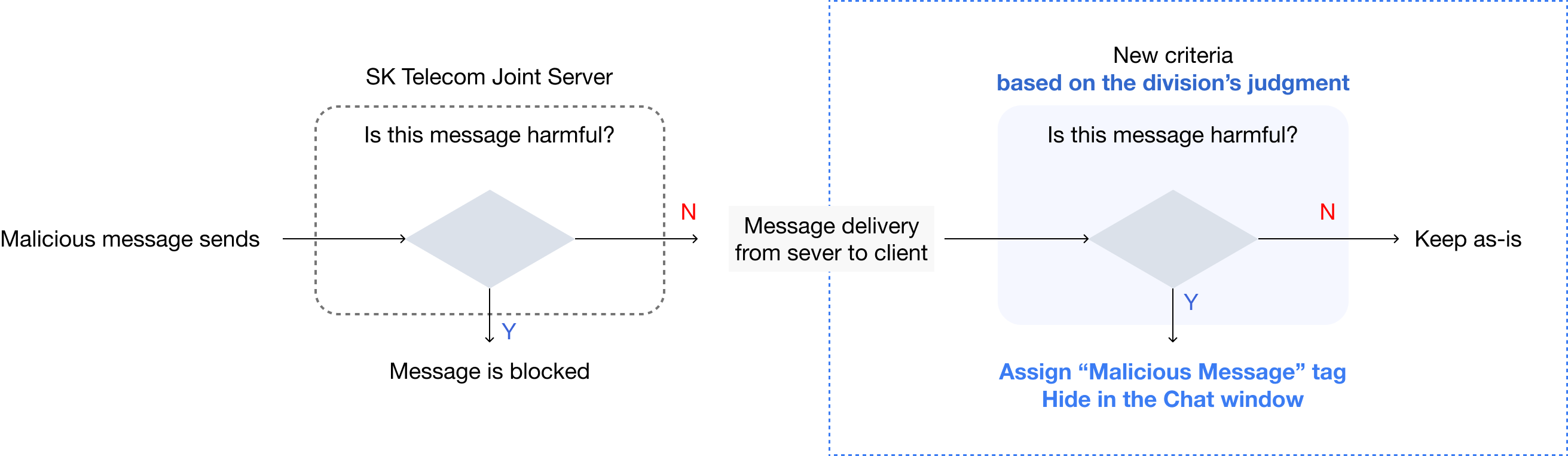
Clean+ uses AI to identify "suspected malicious messages" and hides them instead of the standard approach of outright deletion. Users can then review and choose to delete or restore them.
Previously, SK Telecom's server blocked malicious messages only following government guidelines, as the company had to take a conservative approach due to its market position. With 24 million subscribers representing 44% of Korea's population and being an oligopolistic enterprise subject to government regulations, the company needed to minimize legal risks when filtering messages.
Clean+ helps avoid legal risks, protects revenue, and empowers the business team to take a more proactive role in managing malicious messages.
June. 2023 - June. 2024
Team project
1 Product Manager, 1 GUI Designer, 1 Software engineer
My Role
- Designed and conducted beta testing and focused group interview
- Identified key insights
- Listed new feature ideas
- Prioritized features
- Created feature specifications
- Designed user flows
- Collaborated with developers
- Followed up on QA
1. Scam messaging is also tied to revenue interests
2. Improving the user experience by filtering such messages may negatively impact revenue due to the current business structure
1. The existing filtering system is operated in accordance with government guidelines on malicious messaging.
2. If a non-harmful message is blocked due to additional team-level filtering, the team may be held responsible.

I could take action at the point between when the message is delivered from the server and when it appears in the message list.
Then I wondered, even if the malicious message reaches the device and gets billed, wouldn't it be okay as long as it's hidden from the user's view?

1. Based on the definition of "suspected malicious messages" determined by the division.
2. Messages are classified using AI, and hidden in the chat window.
3. If the customer wants, they can restore or delete the hidden messages.
When a suspected malicious message arrives on the device, the broom button turns on.
The message is already hidden from both the message list and the chat room.
If the user clicks the button, they can view the list of suspected messages and choose to either restore or delete them all at once.

Throughout this feature, the Clean button helps maintain a good balance between preserving revenue and improving the user experience with malicious messaging.
Also, it doesn't add extra responsibility to the team or company, since users can review the hidden messages and choose whether to restore or delete them. I left the company after I finished QA testing in staging.

As Chat+ is a key SK Telecom service used by 40% of Koreans, maintaining reliability and stability is crucial across all platforms, including PC. Therefore, it was determined that robust malicious message management features were necessary.
The developed solution strategically satisfied multiple objectives - legal requirements, product revenue, and spam message management authority. However, the feature could have been more robust with the collection of raw data on suspicious ㅡmalicious messages to establish comprehensive filtering criteria.

Why Beta Test?
The Chat+ PC version is a new feature being integrated into Samsung's One UI 6. Thus, it had to be includedas part of Samsung's One UI 6 beta test program.

Why Focused Group Interview?
I conducted FGI to gather user perspectiveson future features, which was a limitation in the beta test.

Duration:Sep 6, 2023 - Sep 26, 2023
Total Applicant: 332
Registration Method: Available through Samsung Members application after downloading Samsung's new OS version (One UI 6.0)Key Survey
Questions: Inquiries about improvement suggestions for existing features and potential new features
1. Due to the characteristic that testing was only possible on PC, unlike other One UI features, there was relatively super low participation to find meaningful insights.
2. Compared to other chat services, users faced multiple service restrictions (including limited PC compatibility, 500-message daily limit, and messaging limitations with iOS users), resulting in a high volume of usage-related inquiries.
3. Split management between Samsung (mobile) and SK Telecom (PC) led to delays in issue identification and resolution.
4. Limitations of voluntary participation and feedback collection.

...
Despite these constraints, additional research was conducted
by adopting a research methodology to address the major issues identified during the beta test and by implementing stricter researcher criteria.

01. Participant Recruitment and SelectionTo address low beta test participation rate, user research was conducted targeting loyal mobile service users, with interviews organized by four major occupational groups identified from top 10% users, anticipating active participation due to their familiarity with the service and potential to build a cross-platform loyal user base. A total of 29 participants took part in interviews across four occupational groups.

02. Pre-task Instruction ProvidedTo overcome the limitations of PC-only testing and voluntary participation experienced during the beta test, I introduced preliminary tasks aimed at improving service understanding and discovering use cases. These pre-testing activities were complemented by detailed usage guides, with appropriate compensation provided to encourage participant engagement.

1. Installation Guide
2. Usage Limitations: Daily message limit: 500 messages, iOS users cannot receive messages
3. Feature-specific Usage Guides: Message sending (group, 1:1, broadcast), Trying out the settings feature, Synchronization management, etc
4. Occupation-specific Use Case Guides: Please use this app during your work hours throughout the test period
Affinity Diagram analysis of FGI sessions revealed significant user concerns about malicious messages on Chat+ PC, with more than half of participants reporting difficulty distinguishing harmful messages from legitimate ones and experiencing higher rates of malicious content compared to other services, leading some users to consider switching platforms.